Ultimate Robo Duel 3D
Two robots, one arena, a full fighting-game moveset.
 Loads instantly · Free · No install
About Ultimate Robo Duel 3D
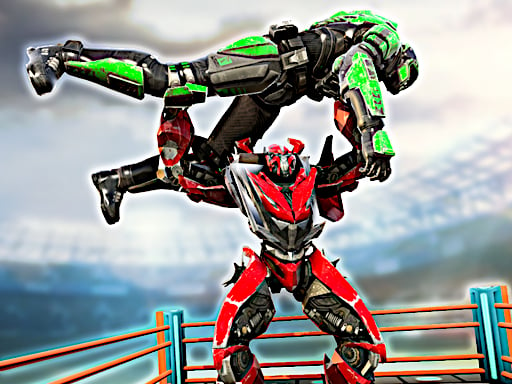
Ultimate Robo Duel 3D is an arena fighting game with advanced robots. The developer leans on realistic sounds, effects and atmosphere to make the arena feel solid, and gives each robot a fuller moveset than most browser duels: two punch keys, two kick keys, a special hit, a bullet and a grab move for each side.
You can fight the computer or bring a friend into the 2 player mode on the same keyboard. Playing the computer is a sensible way to learn where your keys are before a friend takes the arrow keys and finds out whether you actually learned them.
How to play
Choose to fight the computer or a friend in 2 player mode. Player 1 moves with W A S D, punches with F or G, kicks with C or V, uses the special hit on H, fires a bullet with T and grabs with B. Player 2 moves with the arrow keys, punches with U or I, kicks with J or K, uses the special hit on O, fires with M and grabs with L. Mix your attacks instead of repeating one button.
Controls
- P1 — W A S D move, F/G punch, C/V kick, H special, T bullet, B grab
- P2 — Arrows move, U/I punch, J/K kick, O special, M bullet, L grab
- Solo vs CPU supported
Tips to win
- Learn one punch key and one kick key first; a short, reliable loop beats mashing every button.
- Use the bullet against an opponent who hangs back, then close in while they react to it.
- Work the grab into your attacks so your opponent cannot predict what is coming next.
Ultimate Robo Duel 3D strategy guide
Six functions per side, and the keyboard is genuinely split. Player one moves on W A S D with F and G to punch, C and V to kick, H for the special hit, T for the bullet and B to grab. Player two mirrors it on the arrow keys with U and I, J and K, O, M and L. That is a lot of keys, but they are grouped so each hand stays in one place. Learn your own set and ignore the other side's entirely.
Start with three keys, not six. Movement, one punch and one kick is enough to fight competently. Adding the special, the bullet and the grab one at a time is far faster than trying to hold every key in your head at once, and it avoids the classic beginner habit of looking down at the keyboard in the middle of a duel.
The bullet is your ranged option. T for Player 1 and M for Player 2 fire a bullet, which gives you a way to hit an opponent who keeps their distance instead of walking into your punches. Firing it constantly is predictable, though, so use it to make a cautious opponent move, then follow up close with punches and kicks.
Variety is what makes the moveset work. Each robot has punches, kicks, a special hit, a bullet and a grab move. An opponent who has seen the same punch five times knows when to step away from it. Mixing in a kick, the grab or the special hit keeps them guessing, and that uncertainty is where most of the game's depth comes from. Watch how your opponent reacts to each attack and lean on whatever they handle worst.
Learn on the computer, settle it against a friend. Fighting the computer is the right place to memorize your keys without somebody exploiting the pauses while you find them. Once your hand knows where everything is, 2 player mode on the same keyboard is what the game is built for, and the arena, the sounds and the effects all land better with a person on the other side.
Ultimate Robo Duel 3D FAQ
Can I play against the computer?
Yes. There is a 1 player mode against the computer as well as the 2 player mode on one keyboard.
How do I shoot a bullet in Ultimate Robo Duel 3D?
Player 1 fires with T and Player 2 fires with M. The bullet is a ranged attack, handy against an opponent who hangs back instead of closing in.
Does each robot have a grab and a special move?
Yes. Player 1 grabs with B and uses the special hit on H, while Player 2 grabs with L and uses the special hit on O, on top of two punch keys and two kick keys each.