ShooterZ.io
Make a lobby, pick a map, and shoot it out with whoever joins.
 Loads instantly · Free · No install
About ShooterZ.io
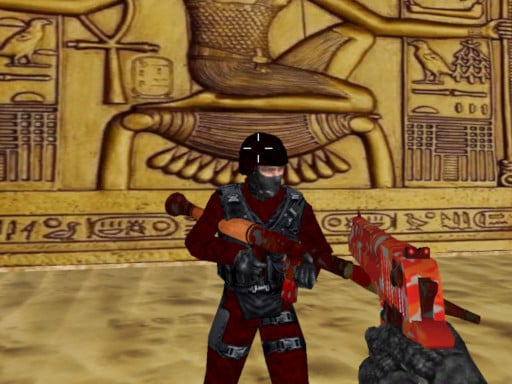
ShooterZ.io is built around game rooms rather than automatic matchmaking. You either create a lobby and set it up the way you like, or join one somebody else has already made, which makes it easy to get a group of friends into the same match.
The developer lists multiple environments to fight in, so rounds do not all look alike. The shooting covers the basics: shoot, aim, reload, crouch and switch between weapons on the number keys. There is a text chat built in, which is the natural place to agree on teams or house rules in a private lobby.
How to play
Create your own lobby or pick an existing one. Shoot with the left mouse button and aim with the right, press R to reload before a fight rather than during one, and use C to crouch. Number keys 1 to 9 switch weapons, P pauses, and T opens the chat (Enter sends your message).
Controls
- Left mouse — shoot
- Right mouse — aim
- R — reload
- C — crouch
- 1-9 — change weapon
- T — chat, Enter to send
- P — pause
Tips to win
- Reload the moment a fight ends; starting the next one with a nearly empty weapon is a common mistake.
- Hold the right mouse button to aim before you fire instead of spraying shots.
- Settle on a weapon you like for each environment rather than cycling through all nine number keys.
ShooterZ.io strategy guide
Mouse and keyboard controls. Shoot with the left mouse button and aim with the right. Press R to reload, C to crouch, P to pause, and use the number keys 1 to 9 to change weapons. T opens the chat, and Enter sends your message. It is a lot of keys at first, but you only need a few of them in most fights.
Rooms, not random matches. ShooterZ.io is a multiplayer game built around game rooms. You can create a lobby set up the way you like, or choose one that someone else has already made. That makes it easy to get a group of friends into the same match and play together.
Reload at the right time. One of the most common mistakes is running into a fight with a nearly empty weapon. When things are quiet, press R so you start the next encounter ready. Reloading in the middle of a fight leaves you open, so try to do it behind cover.
Aim and crouch. Holding the right mouse button to aim helps you hit what you are shooting at, and crouching with C makes you a smaller target. Getting used to aiming before you fire, rather than spraying shots, will improve your results more than anything else.
Learn the maps and weapons. There are multiple environments, and each one plays a little differently. Spend time learning where the cover is and which weapon suits each map, then stick with it instead of switching constantly. If you are playing with friends, use the chat to agree on teams or rules for the room before the action starts.
ShooterZ.io FAQ
Can I play ShooterZ.io with friends?
Yes. You can create your own lobby or join one someone else made, so friends can play in the same room.
How many maps does ShooterZ.io have?
The game has multiple environments to fight in, so rounds do not all look the same.
How do you switch weapons in ShooterZ.io?
Press the number keys 1 to 9 to change weapons without opening a menu. A common mistake is swapping mid-fight because a magazine ran dry; press R to reload while things are quiet instead, and change weapons only when the situation calls for a different tool, such as a longer sightline on a new map.
How do you use the chat in ShooterZ.io?
Press T to open the text chat, type your message, and press Enter to send it. In a lobby you created, chat is the easiest way to agree on teams or house rules before a round starts, since rooms are set up by players rather than filled automatically, and everyone in the room can read it.