Low Poly Car Racing
Split-screen blocky racing — and you can build the track yourself.
 Loads instantly · Free · No install
About Low Poly Car Racing
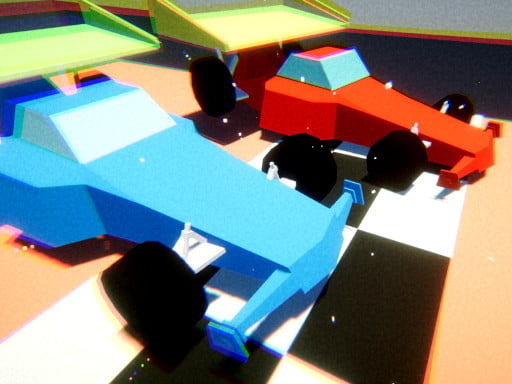
Low Poly Car Racing does the thing most browser racing games do not: genuine split-screen for two people on one machine. The blocky 3D style keeps it running smoothly while both halves of the screen are drawing, which is presumably the point of the art direction.
The track builder is the other reason to bother with it. You lay out your own circuit, save it into one of three slots, and then race it solo or against someone sitting next to you. Points earned in races buy new cars, and there are three modes to work through.
How to play
Player 1 drives with WASD and player 2 drives with the arrow keys, with the screen split between you. Pick one of the three game modes, choose and colour your car, and race. Use the track builder to design your own circuit and save it into one of three slots, then race on it solo or with a friend on the same computer. Points from races unlock new cars.
Controls
- Player 1 — WASD to drive
- Player 2 — Arrow keys to drive
- Split screen, two players on one computer
Tips to win
- Build your first custom track wide. Narrow circuits are unreadable on half a screen.
- Learn the braking distance in single player before racing anyone — the blocky cars carry more speed than they look like they should.
- Spend early points on a car you can control rather than the fastest one available.
Low Poly Car Racing strategy guide
Learn the car alone before you race a friend. Low Poly Car Racing works in single player as well as split screen, and a few solo laps are the fastest way to learn how the blocky cars turn and slow down. Player one drives with WASD and player two with the arrow keys, so each driver only has four keys to master. Get comfortable with when to lift off before a corner, because carrying too much speed is the easiest way to lose a race.
Split screen changes how you should drive. With the screen divided, each player sees a narrower view of the road, so corners appear later than they would full screen. Drive a little more conservatively into bends you do not know yet.
Pick a game mode and set up the car first. Before a race you choose from three game modes and can change your car's colour. Try each mode to see which suits you, and give the two cars clearly different colours in split screen so neither player loses track of which half is theirs mid-race.
Build tracks that are fun to race, not just hard. The track builder lets you design your own circuit and save it into one of three slots, then race it solo or with a friend on the same computer. Wide roads and a mix of long straights and a few tight corners make the best head-to-head tracks. A layout packed with hairpins mostly produces crashes, especially when each driver only has half the screen.
Spend points with a plan. Races earn points that you can use to buy new cars. Rather than saving blindly for the flashiest option, pick a car you can actually keep on the road, since clean laps beat raw speed on most tracks. Use your saved slots to keep a practice layout and a race layout, and swap between them as you improve.
Low Poly Car Racing FAQ
Is Low Poly Car Racing 2 player?
Yes. It has split-screen two-player racing on the same computer, with player one on WASD and player two on the arrow keys. You can also race solo.
Is it free to play?
Yes, Low Poly Car Racing is free to play in the browser.
Can you make your own tracks in Low Poly Car Racing?
Yes. The track builder lets you design a circuit and save it into one of three slots, then race it alone or with a friend.